
New firmware v17.1.F for devices using the new NUR3-0W5 RFID module. (STIX, EXA31)
Changes:
- Vietnam region TX power limit
Bug fixes:
- Dynamic power saving not turning off the PA
Fixed “power saving“ functionality while performing a long period of inventory streaming.
The problem was an overheating RFID module, where power-saving did not turn off the PA, causing reduced inventory speed when 80 ºC was reached.
Updating firmware.
1. Download the FW file and save into your PC filesystem.
Firmware v1.17.F
2. Open update page: https://nordicid.github.io/nur_nurapi_typescript/firmware-update/ using a Chromium-based web browser.
3. Power up the target device and connect. (USB for STIX. Bluetooth for the EXA devices.)
4. Drag and drop the FW file (*.bin) in the area or click to browse.
5. Follow the instructions for updating the app.
Power saving settings.
When using STIX or EXA31 for continuous inventorying over a long period, it’s necessary to use one of the power-saving options.
- Close existing device connection (from updating page)
- Open RFID Studio (web-based) https://nordicid.github.io/nur_rfid_studio/
- Power up and connect the device.
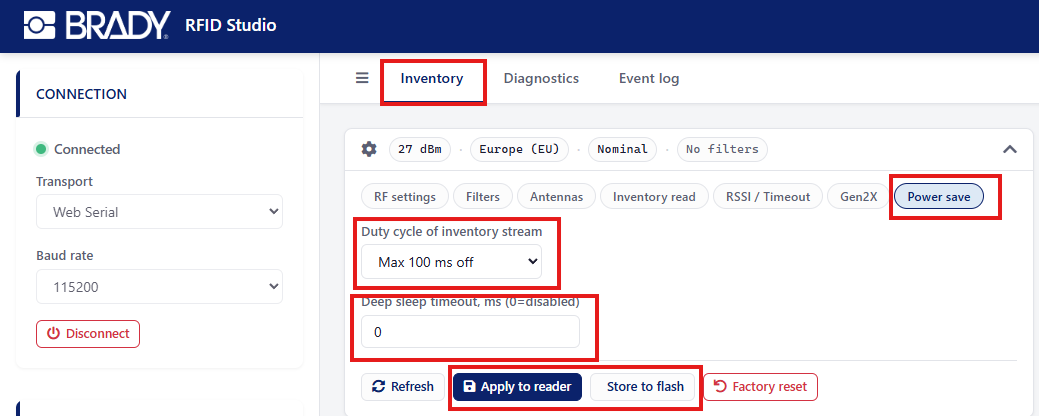
- Select InventoryàPower Save àSet “Duty cycle of inventory stream” other than “Off”
Power save option example:
“Max 100 ms off” = After every inventory round, and if tags are seen, a 100ms delay occurs before starting a new inventory round.
“Forced 100 ms” = After every inventory round, a 100ms delay occurs regardless of whether any tags are seen or not. - Set "Deep sleep timeout to 0 (disabled). Helps with the device enumeration.
- “Apply to Reader” (settings getting in use but lost after power-cycle)
- Press “Store to flash” to save settings to permanent memory.
- Your device is ready to use.
Power-saving options can also be set in the application using NurApi.